
#833 Solving cassidoo’s moveNums on Arduino
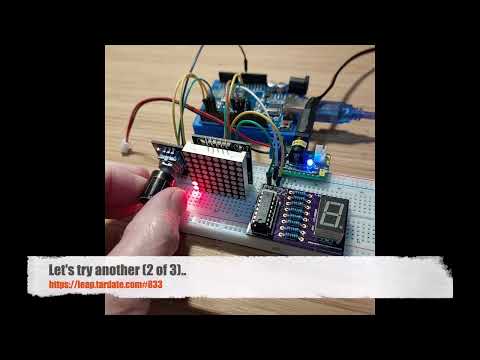
Using an Arduino to interactively solve cassidoo’s interview question of the week (2026-02-09): using a rotary encoder to enter an array on an LED 8x8 matrix, dial-in a target digit on a 7-segment display, and then let it animate the recalculation of the matrix accordingly.

Here’s a quick demo..
Notes
The interview question of the week (2026-02-09) asks us rearrange an array:
Given an integer array and a number n, move all of the ns to the end of the array while maintaining the relative order of the non-ns. Bonus: do this without making a copy of the array!
Example:
moveNums([0,2,0,3,10], 0)
[2,3,10,0,0]
I originally solved this using Factor: see LCK#412 moveNums, but all the while I was visualizing the solution. So why not try to implement it with LEDs and an Arduino?
The basic idea:
- an 8x8 LED matrix will display our array:
- 8 members (columns) - fixed size
- each with a value of 1..8 (rows)
- I am not allowing “0”, as a blank column on the LED matrix can be misleading
- a rotary encoder with press-switch is used to enter the array:
- dial up the desired value
- click to move to next position
- once the array has been entered it then moves to a 7-segment display to select the value of “n”:
- again the rotary encoder is used to dial in the value. it is constrained to select 1..8
- a final click completes the entry
- then we just do the magic:
- re-arrange the columns to move all columns that match the “n” to the right
- another click will restart the process
The moveNums Algorithm
The algorithm I’ve used here to implement moveNums is an in-place strategy that operates on the array of values int8_t columns[MAX_COLS].
The basic procedure:
- iterate all columns from position 0
- if the value doesn’t match
n, move to the next column - if the value does match
n, find the to next column that doesn’t matchn: swap values then move to the next column
Here is the core method as implemented in C++ for the Arduino.
For display animation purpose, it updates the column display with a short delay after each swap:
void MatrixDisplay::moveNums(int8_t n) {
  for (uint8_t c = 0; c < MAX_COLS; c++) {
    if (columns[c] != n) continue;

    for (uint8_t swap = c; swap < MAX_COLS; swap++) {
      if (columns[swap] != n) {
        columns[c] = columns[swap];
        columns[swap] = n;
        display_column(c);
        delay(ANIMATION_DELAY);
        display_column(swap);
        delay(ANIMATION_DELAY);
        break;
      }
    }
  }
}
Circuit Design
Key components I am using:
- an Arduino Uno
- Rotary Encoder Module with push-button action
- an 8x8 LED Matrix with SPI interface
- a 7-segment LED mounted on an adapter board with a SPI-like 74HC595 shift register interface LEAP#178 7-Segment Shift Drive Module
When all the LEDs are on, the current draw is too much to be powered from the Arduino Uno, so a separate 5V power supply is used to power the peripherals.
Designed with Fritzing: see move-nums.fzz.


Wired together on a breadboard:

The Program
This is a quick overview of the program structure:
- move-nums.ino
- the main program loop
- implements the state machine for the sequence of operations
- ButtonMonitor.h/ButtonMonitor.cpp
- responsible for monitoring the push-button on the rotary encoder
- de-bounces the button in software
- DigitDisplay.h/DigitDisplay.cpp
- responsible for tracking the 7-segment digit value and updating it’s display
- EncoderState.h/EncoderState.cpp
- responsible for tracking the rotary encoder state
- MatrixDisplay.h/MatrixDisplay.cpp
- maintains the array that is represented on the LED matrix
- responsible for updating the LED matrix
- implements the
moveNumsmethod
Non-standard libraries used:
- LedControl - LED matrix driver
- Rotary - rotary encoder driver
Demonstration
Entered a series of values on the matrix:

After selecting “3” on the 7-segment display and recalculating the matrix - the column with 3 LEDs has been shifted to the right:

Here’s a quick demo video..
Credits and References
- cassidoo’s interview question of the week (2026-02-09)
- LCK#412 moveNums
- LEAP#178 7-Segment Shift Drive Module
- “Rotary Encoder Module for Arduino Dropshipping” (aliexpress seller listing)
- Purchased for US$1.03 (Jul-2015)
- No longer available from this seller
- “1PCS Free Shipping SCM MCU Control LED Display Module DIY Kit for Arduino MAX7219 Dot Matrix Module Microcontroller” (aliexpress seller listing)
- Purchased for US$1.59 (Jun-2015)
- No longer available from this seller